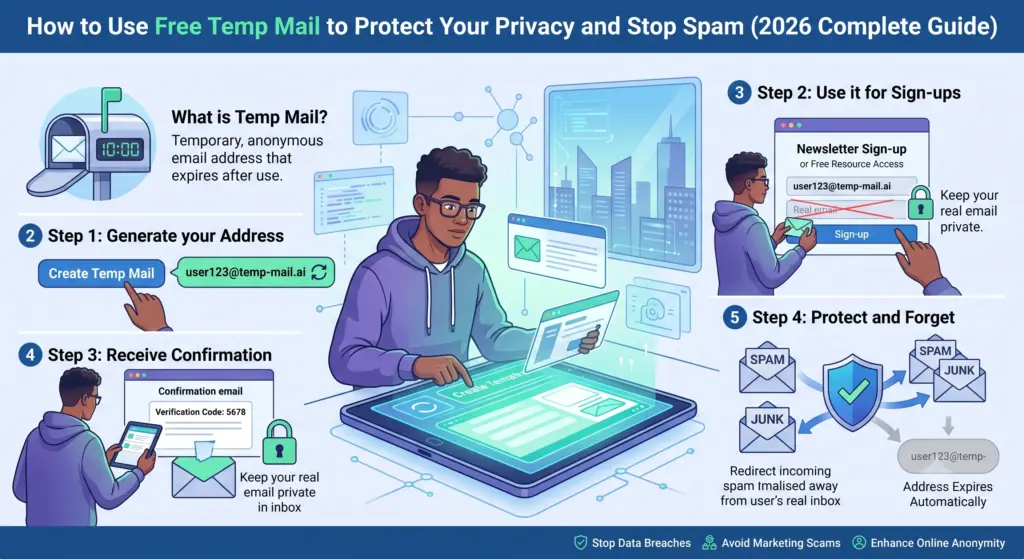
How to Use Free Temp Mail to Protect Your Privacy and Stop Spam (2026 Complete Guide)
In today’s hyper-connected world, your email address functions exactly like your digital passport.
Every time you sign up for a newsletter, access a free AI tool, or download a promotional guide, you are handing over a piece of your digital identity.
Many people do not think twice before typing their primary email address into a random signup form.
However, that simple, fleeting action is the gateway to hundreds of unwanted emails, aggressive marketing campaigns, phishing attempts, and severe data leaks.
Let’s start with a simple, undeniable truth: you do not have to accept a flooded, messy, and dangerous inbox.
Taking back control of your digital life takes only a few seconds, and it will save you hours of deleting junk mail, unsubscribing from lists, and worrying about your digital footprint.
As an AI analyzing global cybersecurity trends and online privacy tools in 2026, I have processed vast amounts of data on how spam networks operate and how temporary inboxes offer a foolproof defense.
In this guide, you will learn:
- ✔ How Temp Mail actually works
- ✔ When you should use it
- ✔ When you should avoid it
- ✔ How hackers misuse disposable emails
- ✔ How companies detect temporary email addresses
- ✔ Best Free Temp Mail Services in 2026
- ✔ Common mistakes people make
What is free temp mail and how does it stop spam?
Free temp mail, also known as a disposable email or burner address, is a short-term, self-destructing email service used to protect your primary inbox from spam, phishing, and unwanted marketing.
You can generate a temporary, anonymous email address with a single click, use it for online registrations, and discard it after receiving necessary verification links.
Because the inbox automatically deletes itself after a short period, it effectively breaks the communication chain.
This reduces your digital footprint, keeps your main inbox secure, and stops spam before it even starts.
It is the ultimate tool for one-time signups, free trials, and protecting your personal data online.
| Term | Meaning |
| Temp Mail | A temporary email address that automatically expires and deletes its contents after a set period. |
| Disposable Email | A one-time, “burner” email address used to receive messages without revealing your permanent inbox. |
| Digital Footprint | The trail of data you leave behind on the internet, heavily tied to your primary email address. |
| Anonymous Email | An inbox used to increase online privacy by separating your real-world identity from your web activity. |
The Core Concept: What is Free Temp Mail?
What exactly is a temporary email address, and why has it become an absolute necessity for modern internet users?
A temporary email address is a fully functional, disposable inbox that self-destructs after a short period.
“What is a temporary email address used for?”
Primarily, temporary email acts as a digital shield—a buffer zone—between your real identity and the unpredictable, often insecure public internet.
Instead of sharing your personal Gmail, Outlook, Apple, or Yahoo email address, you receive a randomly generated email address from a specialized service.
You use this generated address wherever an email is demanded by a website.
The most appealing aspect of free temp mail is the lack of friction. With a reliable temp mail provider, there is:
- No registration required to get the email address.
- No password to remember.
- No personal information tied to the account.
- No phone number needed for verification.
- No setup process or complex configurations.
Read It
Think of “Temp Mail” Like a Paper Cup ☕
To know how this works, compare a temporary email address to a disposable paper cup at a water cooler.
When you are thirsty, you grab a paper cup, fill it with water, drink it, and throw it in the recycling bin.
You do not take the cup home and do not wash it. You also do not store it in your kitchen cabinet for next year. It serves a single, immediate purpose and is then discarded.
A temporary email is designed for the exact same short-term utility. You need to bypass a gateway (like an email verification screen) to get what you want (a file, a discount code, a trial account).
Once your purpose is fulfilled and the verification code is clicked, you simply close the browser tab.
The “cup” is thrown away, and your permanent, personal email inbox remains perfectly clean and untampered with.
Why Your Privacy is at Risk?
To understand why temp mail is so vital in 2026, you must understand why every website is so desperate for your email address.
The modern internet runs on data, and your email address is the ultimate master key to your online profile.
When you enter your email into a website, you are not just agreeing to receive a newsletter. You are entering the Data Economy.
The Email Tracking
Many websites collect email addresses for aggressive marketing and tracking purposes.
When you provide your primary email, you are subjected to:
- Cross-Site Tracking: Companies use a masked version of your email as a digital fingerprint to track your behavior across different, seemingly unrelated websites.
- Data Brokering: Dishonestwebsites package your email address along with your browsing habits and sell them to third-party data brokers.
- Targeted Advertising: Social media platforms and ad networks use your email to serve you hyper-specific, sometimes Unwanted advertisements.
- Relentless Marketing Funnels: You will be placed into automated marketing sequences that send daily promotional emails, “special offers,” and survey requests.
The Cybersecurity Threat: Phishing and Breaches
Beyond mere annoyance, exposing your primary email address carries severe security risks.
Your primary email is likely connected to your online banking, your healthcare portal, your work communications, and your social media accounts.
It is the central hub for your password recovery links.
If a random, poorly-secured forum or free-tool website you signed up for experiences a data breach, your email address is leaked to the dark web.
Cybercriminals then use your email to launch:
- Credential Stuffing Attacks: Hackers test your leaked email and password combination across hundreds of high-value sites (like banks or Amazon).
- Spear Phishing: Attackers send highly convincing, fake emails pretending to be your bank, tricking you into revealing sensitive data.
By using a disposable email, you completely nullify these threats. Even if the temporary inbox is compromised in a data breach, it is a dead end. The hacker gains access to an inbox that no longer exists and has zero ties to your actual life.
How Does Disposable Email Actually Work?
You might wonder how a system can instantly generate working email addresses without any backend setup from the user. The technology behind temp mail is incredibly efficient.
The Technical Mechanics
When you navigate to a temporary email website, the server runs a script that instantly generates a random string of characters attached to one of the provider’s domain names (e.g., user7749@burnerdomain.com).
The temp mail provider has configured their server’s Mail Exchanger (MX) records to accept all incoming mail sent to any address under that specific domain. This is known as a "catch-all" setup.
The Step-by-Step to create a Temp Email
- Generation: You visit the temp mail site. The site instantly assigns you a random address and opens a live session on your browser.
- Deployment: You copy this address and paste it into the target website’s registration form.
- Reception: The target website sends an automated verification email. The temp mail provider’s catch-all server receives it and routes it to your specific browser session.
- Action: You read the email in your browser, click the verification link, and get access to your desired content.
- Destruction: Once you close the tab, or once the internal timer expires (usually between 10 minutes and 24 hours), the provider’s script permanently wipes the email and the inbox from their servers.
The Spam Eradication Protocol
How exactly do these short-term inboxes block endless junk mail?
The mechanism is beautifully simple: the inbox simply ceases to exist.
Spam relies on persistent communication channels. Marketing companies, legitimate or otherwise, build massive lists of active email addresses.
If you use your real email to download a free PDF guide, you are placed on a list.
If you try to manually click “unsubscribe” on spam emails, you often inadvertently confirm to the spammer that your account is active, leading to more spam.
Explore It
Breaking the Chain
When you use a burner address, you are giving the marketer a ghost town. They send their automated daily newsletters, their product launch announcements, and their affiliate promotions into the void.
- The Marketer’s End: Their automated system tries to deliver the email.
- The Temp Mail Server: It rejects the email because the temporary address has been deleted.
- The Result: The email bounces back. Eventually, the marketing software automatically removes the dead address from their list to preserve their sender reputation.
You have successfully stopped spam at the source. Preventing a fire is always easier than trying to put one out.
By utilizing a disposable inbox, you ensure that unwanted marketing bots never get a foothold in your digital life.
Step-by-Step Guide: How to Use Temp Mail
Are you ready to set up your first disposable inbox today? The process requires zero technical skills and is virtually identical across desktop and mobile devices.
Desktop and Mobile Walkthrough
Step 1: Choose and Open a Temp Mail Provider
Open a new tab in your web browser (Chrome, Safari, Firefox, etc.) and navigate to a reputable free temp mail service. Do not close this tab until your task is complete.
Step 2: Copy the Generated Address
As soon as the page loads, your new, unique email address will be displayed in large text at the center of the screen. Look for a “Copy to Clipboard” button (usually a small clipboard icon) and click it.
Step 3: Paste and Register
Navigate to the website, app, or service you are trying to sign up for. In the email field of the registration form, paste the temporary email address. Fill out any other required fields (feel free to use a fake name for extra privacy) and hit submit.
Step 4: Await Verification
Switch back to your temp mail browser tab. Do not refresh the page manually unless there is a specific “Refresh” button provided by the service; most modern temp mail sites auto-refresh asynchronously. Within 10 to 60 seconds, the verification email from the target website will appear in the inbox list below your address.
Step 5: Confirm and Destroy
Click on the incoming email to open it. Click the verification link or copy the OTP (One Time Password) code. Once your account is verified and you have downloaded your file or accessed your trial, simply close the temp mail tab. The inbox is now gone forever.
When to Use (and When NOT to Use) Temp Mail
The most critical skill in digital hygiene is knowing context. Not every website deserves your permanent email address, but conversely, some accounts are far too critical to entrust to a disappearing inbox.
The Golden Rule of Temp Mail
If you are ever in doubt, ask yourself one simple question: “Will I ever need to reset the password for this account in the future?”
If the answer is No, use a temp mail.
Or, if the answer is Yes, use your permanent email.
Perfect Scenarios FOR Using Temp Mail
- Testing New Websites and SaaS Products: If you are a developer, software tester, or just a curious user wanting to see the dashboard of a new software-as-a-service (SaaS) tool, use temp mail. You can poke around without getting trapped in a 14-day automated email drip campaign.
- Downloading Free Resources (“Lead Magnets”): The internet is full of “free” eBooks, cheat sheets, templates, and whitepapers guarded by an email wall. Use a burner email to get the PDF and get out.
- Accessing Public WiFi Networks: Airports, hotels, and cafes often demand an email address to connect to their “free” WiFi. These are notorious for harvesting and selling data. Always use a temp mail here.
- Trying Free AI Tools: With the explosion of AI in 2026, hundreds of niche AI image generators and text tools offer 5 free credits upon signup. Temp mail lets you test these tools without cluttering your inbox.
- One-Time Coupon Codes: E-commerce sites frequently offer a “Spin the wheel for 20% off” pop-up in exchange for an email. Grab the coupon with a temporary inbox.
- Reading Gated Articles: Some news sites allow you to read one free premium article if you provide an email. A disposable address bypasses this perfectly.
Dangerous Scenarios to AVOID Temp Mail ⚠️
Using a burner email for the wrong service can lead to permanent data loss, financial lockouts, and severe headaches. Never use temp mail for:
- Banking and Financial Services: Banks send critical OTPs, fraud alerts, and account recovery links via email. If you lose access to the email, you lose access to your money.
- Cryptocurrency Exchanges: Crypto platforms are highly sensitive to security. If your temp email expires, you will not be able to authorize withdrawals or recover your wallet.
- Healthcare and Medical Portals: Lab results, appointment reminders, and telehealth links must go to a secure, permanent address.
- Government Services: Tax portals, DMV accounts, and municipal services require long-term identity verification.
- Work and Education Accounts: University assignments, client communications, and HR portals require a reliable inbox.
- High-Value Purchases and Online Shopping: Order tracking, digital receipts, warranty claims, and return labels depend heavily on your registered email.
- Social Media and Core Subscriptions: If you forget your Instagram or Netflix password and the reset link goes to a deleted temp mail, your account is gone forever.
Primary vs. Email Alias vs. Temp Mail
To master your online privacy, you need to understand the different tools in your arsenal.
Many people confuse temporary mail with email aliases. They are distinct tools designed for different threat models.
1. Primary Email
This is your actual firstname.lastname@gmail.com or custom domain email. It is permanent, highly secure (hopefully protected by Two-Factor Authentication), and holds your real identity.
- Best for: Banking, legal, family, work, and essential accounts.
2. Email Alias
Services like Apple’s “Hide My Email,” SimpleLogin, or AnonAddy create a persistent but disguised email address (e.g., blue_zebra88@icloud.com). This alias forwards all emails to your primary inbox. If the alias starts getting spam, you can toggle it off or delete it.
- Best for: Newsletters you actually want to read, online shopping, accounts you use regularly but don’t fully trust with your main address.
3. Temp Mail (The Burner)
A completely separate, non-forwarding inbox that self-destructs. Nothing ever touches your primary inbox.
- Best for: One-time downloads, sketchy signups, getting past immediate verification walls.
Comparison among Primary Email, Email Alias and Free Temp Mail
| Feature | Primary Email | Email Alias | Free Temp Mail |
| Lifespan | Permanent | Indefinite (Until deleted) | Minutes to Hours |
| Inbox Location | Main Inbox | Forwards to Main Inbox | Separate, web-based temporary inbox |
| Password Required? | Yes | Yes (tied to main account) | No |
| Account Recovery? | Yes | Yes | No |
| Spam Risk Level | Very High | Medium (Can be turned off) | Zero |
| Privacy / Anonymity | Low (Tied to Identity) | Medium | High |
The Best Free Temp Mail Services in 2026
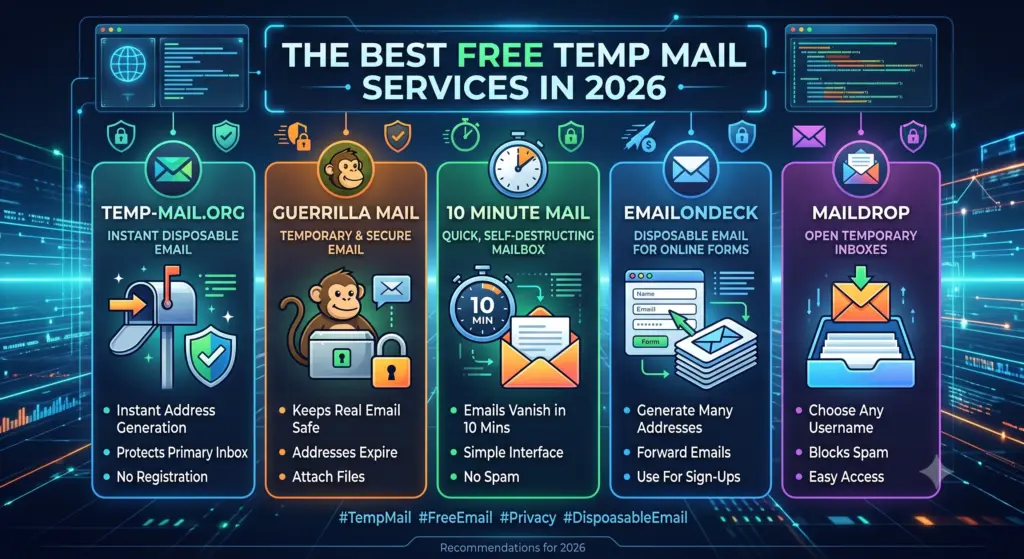
Not all temporary email services are created equal. Some are plagued with aggressive pop-up advertisements, some are too slow for fast verifications, and others use domain names that are heavily blocked by websites.
Based on current internet standards, here are the top-performing free temp mail services available, categorized by their best use case.
1. Temp-Mail.org
Best for: General everyday users seeking a frictionless experience.
Temp-Mail is arguably the most recognizable name in the space. It features a remarkably clean interface and a reliable auto-refreshing inbox.
They constantly rotate their domain names, which helps users bypass websites that try to block disposable email addresses.
They also offer mobile apps for iOS and Android, making it incredibly convenient for smartphone users.
2. Guerrilla Mail
Best for: Developers, testers, and advanced users.
Guerrilla Mail is a veteran in the disposable email space. Its standout feature is that it allows you not only to receive emails but also to send them (with a disclaimer attached to prevent spam abuse).
The inbox retains emails for one hour before deleting them. You can also customize the local part of the address (e.g., changing it from a random string to testaccount123@guerrillamail.com), which is fantastic for software QA testing.
3. 10 Minute Mail
Best for: Lightning-fast, immediate verifications.
True to its name, 10 Minute Mail gives you an inbox with a literal countdown clock on the screen.
It lasts exactly 10 minutes, though you can click a button to extend the timer by another 10 minutes if your verification email is delayed.
It is lightweight, fast, and features almost zero clutter.
4. EmailOnDeck
Best for: Evading aggressive spam filters and blocklists.
EmailOnDeck requires a quick CAPTCHA to access the inbox, which keeps bots off their servers.
Because of this anti-bot measure, their domain names have a much higher reputation and are less likely to be blocked by major platforms.
It is highly secure and frequently used by cryptocurrency enthusiasts and privacy advocates for quick registrations.
5. Maildrop
Best for: Predictable, reusable temporary testing.
Maildrop uses aggressive spam filters on its own temporary inboxes to ensure they don’t get flooded. You can create your own custom inbox name, and as long as it receives fewer than 10 messages, it stays active. If it fills up, it gets wiped. It is an excellent tool for web developers testing sign-up flows.
How to Choose a Trustworthy Provider
When selecting a service from the list above, ensure it meets these criteria:
- Fast Delivery: The inbox must refresh asynchronously without requiring manual page reloads.
- HTTPS Encryption: Look for the lock icon in your browser URL bar. Your connection to the temp mail site should be encrypted.
- No Registration Wall: If a temp mail site asks for your real email to create a temp mail… leave immediately.
- Transparent Deletion Policies: The site should clearly state how long emails are retained (e.g., 10 minutes, 1 hour, or until the tab is closed).
The Security & Privacy Reality Check of Temp Email
While disposable emails are incredibly powerful, it is vital to understand their limitations. A common mistake is assuming that “temp mail” means “military-grade anonymity.”
Can Websites Detect Temp Mail?
Yes. It is a constant game of cat and mouse between website administrators and temp mail providers.
Large companies, financial institutions, and premium SaaS platforms use specialized APIs (like MXToolbox or custom blocklists) to check the MX records and domain reputation of every email entered during signup.
If you try to register for a premium service using @10minutemail.com, the system will likely throw an error: “Please enter a valid business or personal email address.”
To bypass this, top-tier temp mail providers constantly buy new, obscure domain names and rotate them into their system.
If one domain gets blocked, you can usually click “Change Address” to get a fresh domain that hasn’t been denylisted yet.
Can Temp Mail Be Used for OTP Verification?
If a service sends a One-Time Password (OTP) code via an email message, a temporary inbox handles it perfectly. The code arrives, you copy it, and you log in.
However, if the platform requires an SMS (text message) OTP, a temp mail service will not help you.
You would need a separate disposable VOIP phone number service for that.
Does Temp Mail Make You Anonymous?
No. Temp mail protects your primary inbox, but it does not hide your network identity.
When you visit a website, even if you use a burner email, the website can still log:
- Your IP Address (which reveals your general physical location).
- Your Browser Fingerprint (details about your device, screen size, and OS).
- Cookies and Trackers (which can link your session to previous visits).
If you are looking for true anonymity, temp mail is only one piece of the puzzle. It must be combined with a robust VPN (Virtual Private Network), a privacy-focused browser (like Brave or Tor), and strict tracker-blocking extensions.
The Risk of Public Inboxes
Some temp mail services (especially those that let you choose your own handle) operate public inboxes.
If you create the inbox johnsmith@tempdomain.com, anyone else who types in johnsmith@tempdomain.com on that same temp mail site can see the emails sitting in that inbox.
Never, under any circumstances, use a temporary email to receive sensitive documents, password resets, private photos, or financial data.
If an inbox is public or easily guessable, a malicious actor could intercept your private information before the inbox expires.
Advanced Privacy Practices & Expert Tips
To truly master your digital footprint in 2026, you should integrate temporary emails into a broader, structured privacy strategy.
The “Three-Tier Inbox” Strategy
The most secure digital citizens organize their digital lives into three strict tiers:
- Tier 1: The Fortress (Primary Email)
- Usage: Banking, Government, Healthcare, Core Identity.
- Security: Secured with a physical hardware key (like YubiKey) or an Authenticator App. Never given out for discounts or newsletters.
- Tier 2: The Filter (Email Aliases)
- Usage: Online shopping (Amazon, eBay), streaming services (Netflix, Spotify), professional newsletters, and accounts you want to maintain long-term but want to easily sever if they get breached.
- Security: Uses alias forwarding tools so the vendor never sees Tier 1.
- Tier 3: The Burner (Free Temp Mail)
- Usage: Free Wi-Fi, PDF downloads, one-time coupon codes, forum testing.
- Security: Completely disposable. Zero connection to Tier 1 or Tier 2.
Browser Hygiene
When using a temporary email to test a sketchy website, practice good browser hygiene.
- Use Incognito/Private Mode: Open the target website in an incognito window. This prevents the site from reading your existing cookies.
- Clear Cache: Once you are done downloading your file or testing the site, close the incognito window to instantly wipe the session cookies.
- Don’t Click Sketchy Links Inside the Temp Mail: Just because you are using a safe temp inbox doesn’t mean the email contents are safe. If a sketchy website sends you a verification email containing a strange attachment, do not download it to your physical hard drive. Only interact with clean, recognizable verification URLs.
Clearing Up Common Temp Mail Myths
Because digital privacy is a complex topic, several misconceptions surround disposable email tools. Let’s clear the air.
- Myth 1: Temp Mail is illegal.
- Reality: Using a temporary email address is entirely legal in almost every jurisdiction around the world. It is simply a tool for managing communication. While committing fraud using an email (temp or real) is illegal, the act of using a privacy tool to protect your inbox is a fundamental digital right.
- Myth 2: Temp Mail is only for hackers and cybercriminals.
- Reality: While threat actors do use anonymity tools, the vast majority of temp mail users are everyday internet users, college students avoiding spam, web developers testing their software, digital marketers analyzing competitor funnels, and privacy advocates protecting their data.
- Myth 3: Temp mail guarantees safety from malware.
- Reality: Temp mail protects your primary inbox from spam and your identity from exposure. However, if a temp email contains a malicious link and you click it, your local device can still be infected with malware. Always practice safe browsing.
- Myth 4: Every website accepts disposable emails.
- Reality: As discussed above, corporate firewalls and anti-fraud systems actively try to block known temp mail domains. You will occasionally need to try a few different providers to bypass strict filters.
Final Thoughts: Taking Back Your Digital Passport
Your email address is far more valuable than most people realize. It is the connective tissue of your entire digital life, linking your personal communications, your career, your finances, your entertainment, and your geographic location into one cohesive, trackable profile.
Handing it out carelessly to every website that demands it is a surefire way to invite digital chaos, relentless spam, and severe privacy vulnerabilities.
Free temporary mail offers an elegant, frictionless solution to this modern problem. By understanding the core concepts of your digital footprint, the mechanics of spam marketing, and the dangers of phishing, you are now equipped to navigate the internet as a much smarter, highly secure user.
Used correctly, a burner email is the ultimate defense against inbox clutter. It allows you to explore new platforms, test software, download free resources, and protect your identity without sacrificing convenience.
However, remember the golden rule: context is everything. Respect the limits of disposable tools.
Never trust a self-destructing inbox with your banking, healthcare, or core social media accounts.
Implement the three-tier inbox strategy, rely on trusted providers, and maintain good browser hygiene.
As online tracking and data brokering become even more aggressive in 2026 and beyond, small, proactive decisions—like keeping a temp mail tab open while browsing—will make a monumental difference in your digital well-being.
Make privacy a routine, not an afterthought. Try using a disposable inbox today, and experience the immense relief and peace of mind that comes with a perfectly clean, secure, and spam-free primary email.
Frequently Asked Questions
“What is the safest way to use Temp Mail?”
The safest way to use temp mail is strictly for low-stakes, one-time registrations. You should avoid using it for any account containing sensitive personal, financial, or medical data. Always ensure the provider you choose uses HTTPS encryption, and remember that public temp inboxes can be viewed by anyone who guesses the address.
“Can I use Temp Mail for my bank account?”
No, absolutely not. Because temporary inboxes self-destruct after a short period, you will permanently lose access to essential communications like fraud alerts, OTP codes, and password reset links. Always use a highly secure, permanent primary email for financial institutions.
“Is Temp Mail good for testing AI tools?”
Yes, it is excellent for this purpose. Many new AI platforms offer limited free credits or trials in exchange for an email signup. Using a disposable email allows you to test these tools thoroughly without cluttering your main inbox with upgrade prompts and marketing sequences.
“Can I use Temp Mail for online shopping?”
It is generally not recommended for physical online shopping. While it might get you a first-time buyer discount code, you will lose the ability to track your package, receive your digital receipt, or process returns and warranty claims. Instead, use an email alias for online shopping.
“Does Temp Mail hide my IP address?”
No. A temporary email only hides your email identity. The website you visit can still see your IP address, physical location, and device details. To hide your IP address, you must use a reliable Virtual Private Network (VPN) alongside your temporary email.
“How long does a Temp Mail inbox last?”
The lifespan varies by provider. Services like 10 Minute Mail delete the inbox after exactly 10 minutes (unless extended). Others, like Temp-Mail.org, keep the inbox active as long as you keep your browser tab open. Once closed, the data is usually purged from their servers permanently.
“Can I send emails using a disposable address?”
Most free temp mail services only allow you to receive emails to prevent their servers from being used to distribute spam. However, a few niche providers, like Guerrilla Mail, do allow you to send outgoing emails, though they often attach a disclaimer to the bottom of the message.

Leave a Reply