Opening an account on a major cryptocurrency exchange takes only a couple of minutes, but securing that account properly requires deliberate, conscious effort.
If you are entering the digital asset space, your primary goal should never be just clicking register and jumping straight into buying coins.
Because your account will hold hard-earned capital, security must be treated as your very first trading decision from day one.
At ZenvestAI, we have seen far too many beginners treat their exchange login like an ordinary social media profile.
That single mindset flaw is where preventable mistakes begin.
In contrast, treating your Binance profile like a high-security digital vault ensures that your capital remains safe while you focus on navigating the markets.
This practical guide walks you through every verification step, authentication layer, and ongoing safety habit.
💡 Learn the Basics: Want to put your idle crypto assets to work without constant market monitoring? Read the complete overview in What Is Crypto Staking? The Complete Guide to Earning Rewards Safely to learn how validation rewards work, which risks to watch out for, and how to start earning yield securely.
💡 ZenvestAI Explains
To safely set up and secure a Binance account, register exclusively through the verified official platform using a unique, complex password.
Immediately activate hardware-backed Passkeys or an Authenticator App for two-factor authentication (2FA) rather than SMS.
Configure a personalized Anti-Phishing Code, lock down your connected email with separate 2FA, and enable Withdrawal Address Whitelisting to prevent unauthorized transfers.
Maintain strict operational discipline: verify blockchain networks before transactions, never share credentials, and restrict API permissions using IP whitelisting.
Key Takeaways:
Start with a Clean Slate:Always use a dedicated, hardened email address and a completely unique master password managed through an encrypted password manager.
Upgrade Beyond SMS:Switch from SMS-based verification to an Authenticator app (like Google Authenticator or Aegis) or phishing-resistant Passkeys / YubiKeys.
Activate Platform Countermeasures:Set up your Binance Anti-Phishing Code and turn on Withdrawal Address Whitelisting immediately after account creation.
Practice Defensive Operations:Always perform a small test transaction when sending funds to a new address, and double-check network compatibility.
Maintain Strict Secrecy:Understand that legitimate support staff will never ask for your passwords, 2FA codes, remote desktop access, or private seed phrases.
🔍 Deep Dive: Staking is more than just passive yield—it is the foundational security layer for Proof-of-Stake blockchains. For a detailed breakdown of game theory, sybil resistance, and network validation, check out Why Does Staking Exist? The Ultimate Guide to Cryptoeconomic Security.
Binance Setup & Security at a Glance
| Security Layer | Recommended Tool / Setting | Threat Mitigated | Setup Difficulty |
| Login Credentials | 16+ Character Unique Password + Password Manager | Credential Stuffing & Database Leaks | Easy |
| Primary 2FA | Passkey (Biometrics/PIN) or Hardware Key (YubiKey) | Real-time Phishing & Man-in-the-Middle Attacks | Moderate |
| Secondary 2FA | Time-based Authenticator App (TOTP) | SIM Swapping & SMS Interception | Easy |
| Email Defense | Dedicated Email + Separate Hardware/App 2FA | Account Hijacking & Password Reset Exploits | Moderate |
| Communication | Custom Anti-Phishing Code | Spoofed Emails & Fake Account Alerts | Very Easy |
| Fund Transfer | Withdrawal Address Whitelist + Network Check | Unauthorized Wallet Drains & Clipboard Malware | Moderate |
📈 Expand Your Strategy: Ready to explore leveraged markets, hedging strategies, and two-way price action? Step through contract mechanics in What Is Crypto Futures Trading? A Complete Beginner’s Guide.
What This Guide Covers
Pre-Registration Due Diligence: Preparing Your Clean Environment- Registering Your Binance Account Safely
- Hardening the Connected Email Account
- Identity Verification (KYC) Safety Rules
Two-Factor Authentication: Authenticator vs. SMS vs. Passkeys- Safeguarding 2FA Recovery Keys and Backup Data
- Configuring Your Anti-Phishing Code
- Device Management and Session Auditing
- Restricting Fund Exits with Withdrawal Whitelisting
Blockchain Network Verification & The Test Transaction Rule- Address Poisoning and Clipboard Hijacking Defense
- Defending Against Impersonation & Fake Support Scams
- Hardening API Keys for Automated Tools & Bots
- Device Hygiene, Public Wi-Fi, and Shared Hardware Risks
Avoiding Social Engineering, Fake Airdrops & P2P Fraud- The ZenvestAI 5-Layer Security Architecture
- Emergency Playbook: What to Do If Your Account Is Compromised
- Common Security Mistakes & How to Fix Them
- Master Binance Security Checklist
The Bottom Line & Strategic Conclusion
Step-by-Step Guide: How to Safely Set Up and Secure an Account on Binance
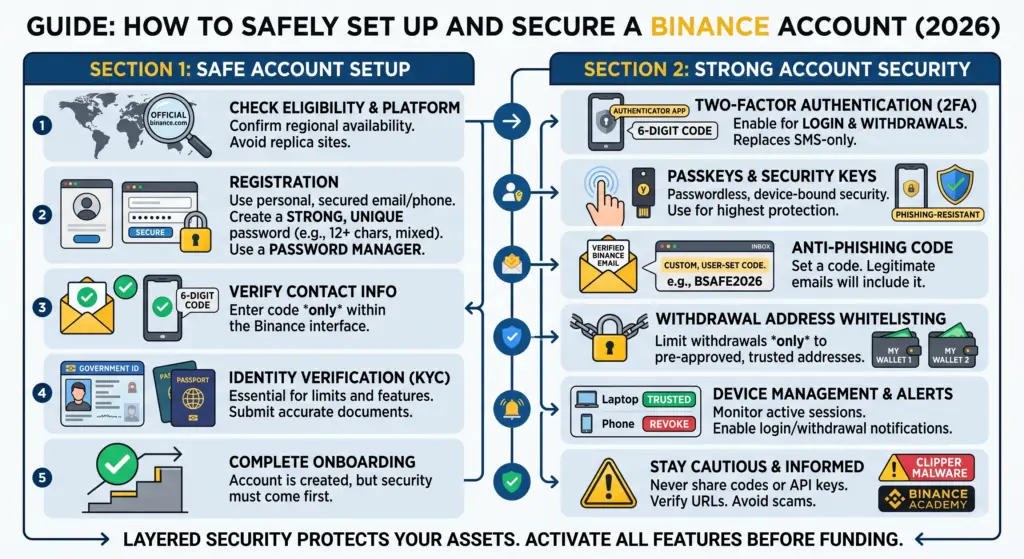
Before You Create Your Binance Account- Preparation is the foundation of digital asset security. Before clicking any registration button, you must verify that your local environment is clean, controlled, and private.
1. Essential Pre-Registration Checklist
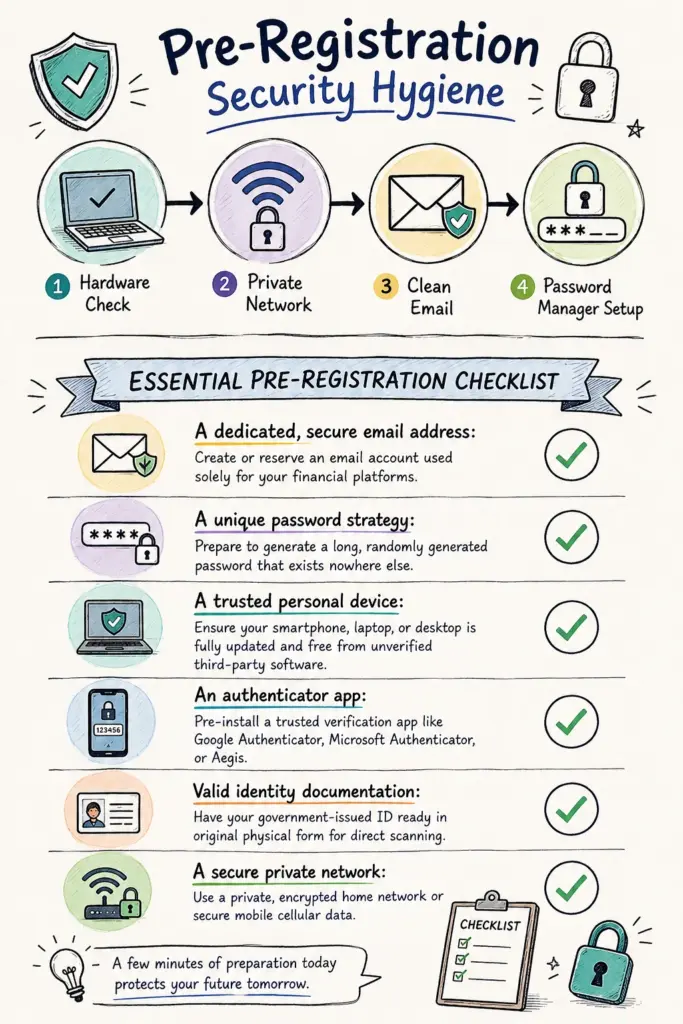
- A dedicated, secure email address: Create or reserve an email account used solely for your financial platforms.
- A unique password strategy: Prepare to generate a long, randomly generated password that exists nowhere else.
- A trusted personal device: Ensure your smartphone, laptop, or desktop is fully updated and free from unverified third-party software.
- An authenticator app: Pre-install a trusted verification app like Google Authenticator, Microsoft Authenticator, or Aegis.
- Valid identity documentation: Have your government-issued ID ready in original physical form for direct scanning.
- A secure private network: Use a private, encrypted home network or secure mobile cellular data.
⚠️ Environments You Must Avoid
Public internet cafes or hotel business centers:Shared devices often harbor keyloggers and screen-capture tools.
Borrowed smartphones or shared office laptops:You cannot verify what background processes are monitoring keystrokes on hardware you do not own.
Open public Wi-Fi networks:Unsecured public networks expose your network traffic to packet sniffing and man-in-the-middle attacks.
Sponsored search engine ad links:Fraudulent sponsored search results frequently mimic authentic domains to steal credentials upon submission.
🛡️ Capital Preservation: A profitable trading strategy depends on trade mathematics rather than win rate alone. Learn how to calculate asymmetrical payoff setups in The Ultimate Risk-to-Reward Ratio Guide: Master Crypto Risk and Protect Your Capital.
2. Create Your Binance Account
Creating your account requires strict attention to the address bar and domain authenticity (Binance account kaise banaye safely).
Follow these precise operational steps to prevent accidental phishing encounters.
Step 1: Navigate Exclusively to Verified Channels
Type the official domain directly into your web browser or download the official app from verified app marketplaces (Google Play Store or Apple App Store).
Never click promotional registration links sent via Telegram, WhatsApp, Discord, X DMs, or unsolicited emails.
Attackers craft clone websites with visual perfection, swapping only a single obscure character in the domain URL.
Step 2: Initiate Account Registration
Select the official sign-up option on the homepage.
Depending on your local regulatory framework and country of residence, you can register using an email address, mobile phone number, or supported single-sign-on protocol.
Step 3: Establish a Long, Unique Master Password
Your exchange password must be distinct from any password you have ever created.
Do not reuse credentials from your banking apps, primary email, social channels, or e-commerce profiles.
Password Architecture Guidelines:
- Minimum of 14 to 18 alphanumeric characters.
- A blend of uppercase letters, lowercase letters, numbers, and symbols.
- Generated and saved directly inside an encrypted password manager rather than stored in plain text notes or browser autofill caches.
🎯 Execution & Discipline: Letting winning trades turn into losses is a common trading pitfall. Learn systematic profit-taking rules and trailing bracket orders in What Is Take Profit (TP)? The Ultimate Step-by-Step Guide to Locking in Crypto Trading Profits with Discipline.
3. Secure the Email Account Connected to Binance
Your registered email address is the critical administrative anchor for your Binance profile.
If an attacker gains unauthorized control of your inbox, they can request password resets, observe withdrawal confirmations, and intercept account alert notices.
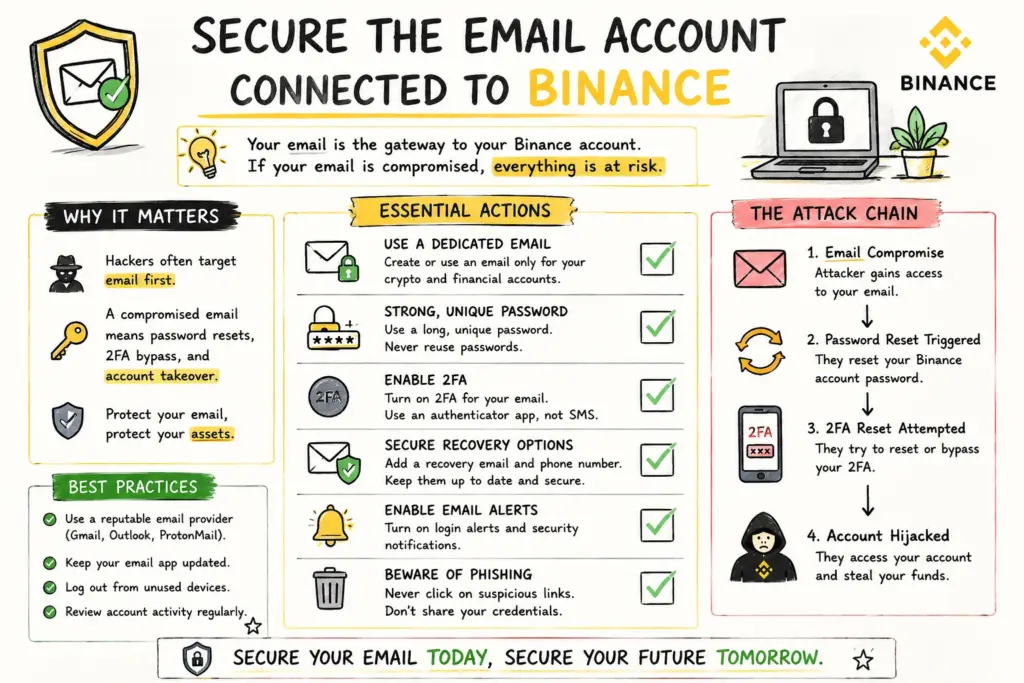
Best Practices for Email Hardening:
Apply Independent 2FA:Protect your email provider with hardware security keys or authenticator apps, not SMS fallback.
Inspect Mail Forwarding Rules:Regularly review your email settings to confirm that no hidden auto-forwarding filters have been established.
Audit Active Email Sessions:Check your email provider’s recent activity logs for unrecognized IP addresses, foreign countries, or unknown devices.
Maintain Zero Public Exposure:Avoid publishing this financial email address on public forums, business cards, social media profiles, or newsletter forms.
📚 Start Here: New to digital assets or looking to solidify your core understanding of blockchain, decentralization, and digital custody? Explore the foundational concepts in What Is Cryptocurrency? The Ultimate Beginner’s Guide.
4. Complete Identity Verification When Required
Identity verification (commonly referred to as KYC or Know Your Customer) is a regulatory standard designed to comply with local financial laws and anti-money laundering frameworks.
While KYC helps platforms verify legitimate account holders, completing identity verification does not automatically protect your balance from credential theft.
Crucial KYC Safety Protocol:
Submit Documents Exclusively In-App:Upload your identification documents solely through the official encrypted Binance verification portal.
Refuse Third-Party Assistance:Never send passport scans, national ID images, or utility bills to individuals claiming to be “Binance verification agents” on Telegram or WhatsApp.
Verify Facial Scans in Real Time:Complete liveness and facial recognition checks only inside the official native mobile application.
💡 ZenvestAI Quick Insight
Why is KYC alone insufficient for account security?
KYC confirms your identity to the exchange for regulatory compliance, but it does not stop an attacker who obtains your password and session tokens.
True security relies on strong authentication, withdrawal locks, and anti-phishing codes that actively block unauthorized access attempts.
🌐 Macro Shift: Decentralized technology extends far beyond digital currencies into settlements, asset tokenization, and institutional finance. Read our deep dive in How Distributed Ledgers Are Radically Rewriting the Rules of Modern Finance.
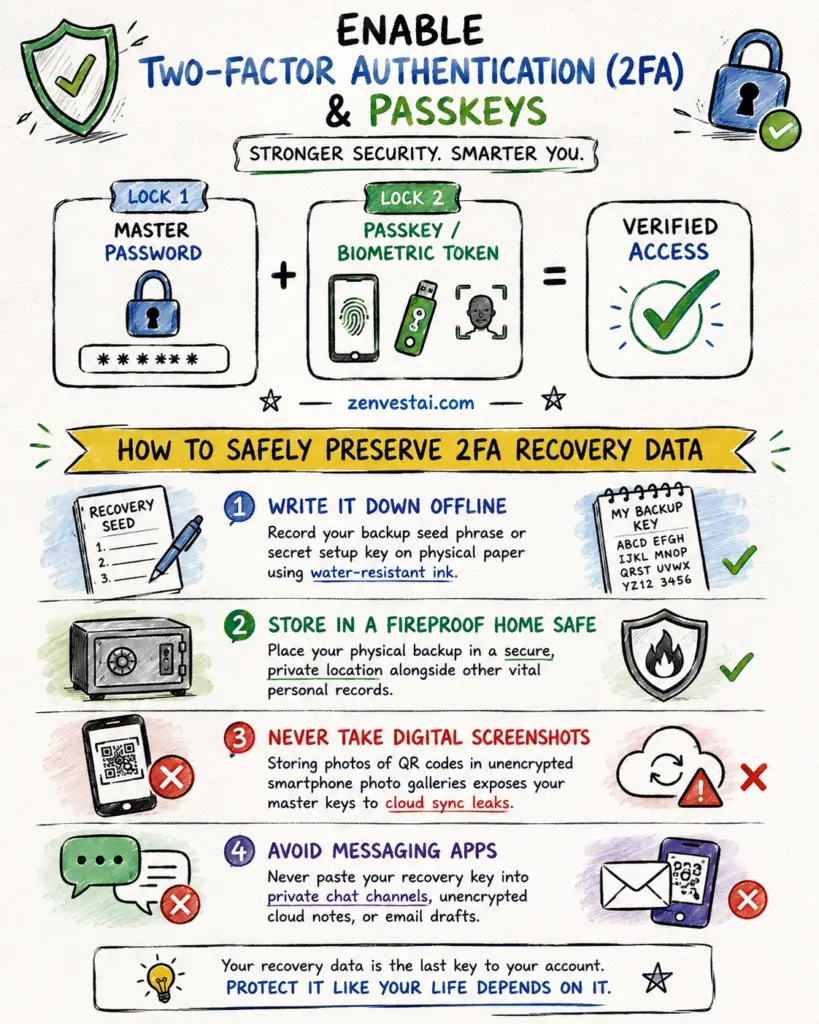
5. Enable Two-Factor Authentication (2FA) & Passkeys
Passwords represent only the first lock on your digital vault.
Two-factor authentication (2FA) introduces a mandatory second barrier that prevents unauthorized logins even if your primary password becomes compromised in an external data breach.
Which 2FA method is the safest for Binance?
1. Passkeys (Modern Gold Standard)
Passkeys use cryptographic key pairs tied directly to your hardware biometrics (Face ID, Touch ID, or Windows Hello) or physical hardware tokens.
Because passkeys are cryptographically bound to the legitimate Binance domain, they provide robust built-in protection against phishing websites.
2. Hardware Security Keys (FIDO2 / U2F)
Physical USB/NFC security keys (such as YubiKeys) represent the highest practical tier of authentication.
An attacker located remotely cannot authenticate without holding the physical device in their hand.
Ultimate Crypto Security
Go beyond exchanges and software wallets. Take true control of your digital assets.
- Manage 15,000+ Crypto: BTC, ETH, SOL, XRP & more.
- One App For All: Buy, swap, and earn with 50+ top providers.
- Unmatched Trust: 8+ million sold worldwide, securing ~30% of all BTC.
3. Authenticator Apps (Time-Based One-Time Passwords / TOTP)
Applications like Google Authenticator or open-source alternatives generate a fresh 6-digit code every 30 seconds entirely offline on your phone.
This approach completely decouples your authentication stream from cellular network vulnerabilities.
Take Control of Your Crypto
Keep your coins offline, untouchable, and truly yours with the original hardware wallet.
- The Original Inventors: 12+ years of proven, 100% open-source security.
- Trusted Globally: Securing crypto for 2+ million users (Rated 4.7/5).
- Seamless Control: Easy to set up with secure apps for mobile & desktop.
4. SMS Verification (Baseline Only)
While SMS verification is better than having no second factor at all, text messages remain vulnerable to SIM swapping, carrier social engineering, and interception.
Whenever possible, treat SMS purely as an emergency fallback rather than your primary defensive wall.
🪙 Wealth Building: Looking to build a disciplined, multi-cycle accumulation plan around digital scarcity and store-of-value principles? Review The Complete Bitcoin Wealth Strategy for allocation models and long-term holding tactics.
6. Protect Your 2FA Recovery Information
Configuring an authenticator app generates a secret setup key (a string of letters and numbers or a QR code).
This recovery key is the master blueprint needed to restore your authentication codes if your phone is lost, damaged, or upgraded.
How to Safely Preserve 2FA Recovery Data:
- Write It Down Offline: Record your backup seed phrase or secret setup key on physical paper using water-resistant ink.
- Store in a Fireproof Home Safe: Place your physical backup in a secure, private location alongside other vital personal records.
- Never Take Digital Screenshots: Storing photos of QR codes in unencrypted smartphone photo galleries exposes your master keys to cloud sync leaks.
- Avoid Messaging Apps: Never paste your recovery key into private chat channels, unencrypted cloud notes, or email drafts.
⚡ Smart Contract Capital: Ethereum powers decentralized applications, Layer-2 ecosystems, and staking yields. Learn how to structure an allocation around network growth in The Complete Ethereum Wealth Strategy.
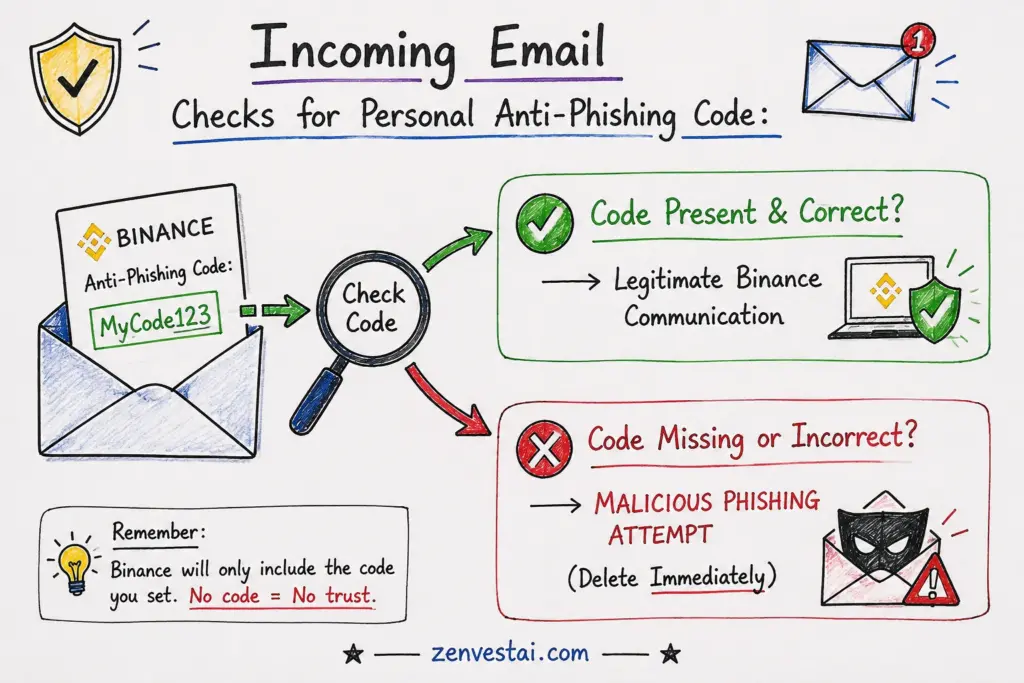
7. Set Up an Anti-Phishing Code
Phishing represents one of the most persistent attack vectors in the cryptocurrency ecosystem.
Fraudulent actors routinely distribute emails that mimic official security alerts, claiming your account is facing immediate suspension or that a withdrawal requires urgent cancellation.
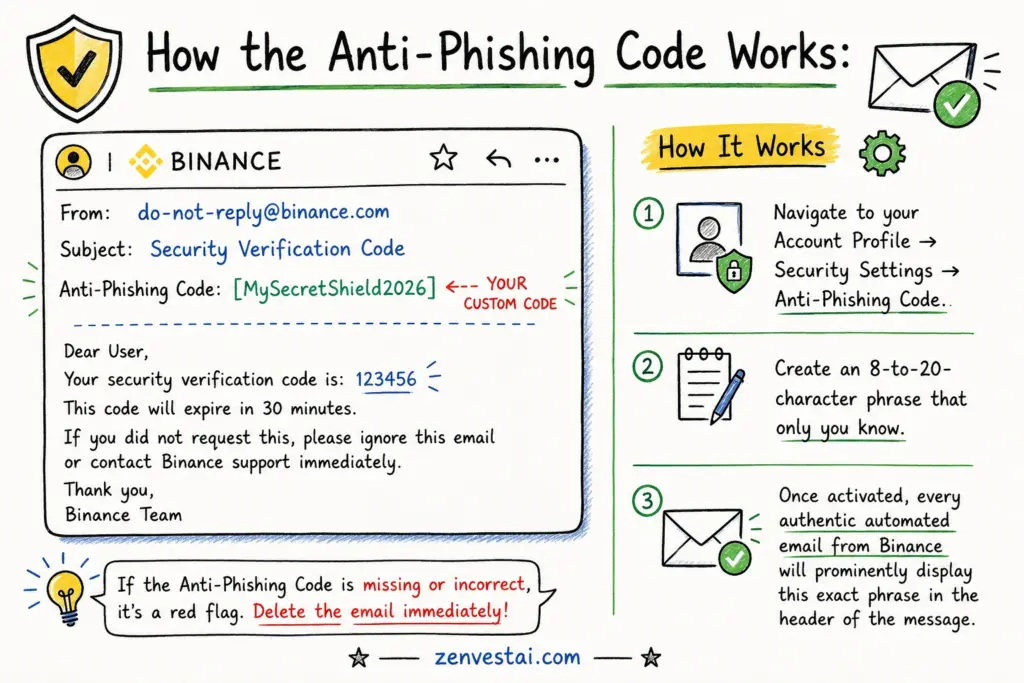
How the Anti-Phishing Code Works:
- Navigate to your Account Profile → Security Settings → Anti-Phishing Code.
- Create an 8-to-20-character phrase that only you know.
- Once activated, every authentic automated email from Binance will prominently display this exact phrase in the header of the message.
💡 ZenvestAI Quick Insight
How does an Anti-Phishing Code stop scammers?
An Anti-Phishing Code acts as a cryptographic handshake between you and the platform.
Because external scammers cannot view your private account settings, their fraudulent emails will lack this custom identifier, instantly exposing them as fakes regardless of how convincing their visual template appears.
🤖 Next-Gen Tech: Machine learning models, predictive algorithms, and automated execution bots are reshaping crypto market dynamics. Discover the latest landscape in How AI Is Transforming Cryptocurrency Trading in 2026.
8. Check Devices and Account Activity
Proactive monitoring ensures that unexpected logins are caught and terminated before any damage occurs.
Make it a regular habit to review which hardware profiles currently maintain active sessions on your account.
How to Audit Device Sessions:
- Open your Security Dashboard and select Device Management.
- Review the list of active smartphones, desktop browsers, and operating systems.
- Immediately remove any device you no longer own, unrecognized mobile models, or sessions tied to unfamiliar geographical locations.
- Inspect Account Activity Records to verify that recent login timestamps align with your actual trading sessions.
💳 Practical Utility: Ready to convert crypto holdings into seamless everyday spending across travel, merchants, and digital payments? Read the practical breakdown in Why the Binance Virtual Card is the Smartest Way to Spend Crypto in Asia (2026 Guide).
9. Enable Withdrawal Address Whitelisting
Withdrawal Address Whitelisting (Address Management) is one of the most effective structural defenses available on modern exchanges.
When enabled, your account can only send funds to pre-approved, verified wallet addresses.
The Protective Mechanics of Whitelisting:
Prevents Instant Drains:If an attacker compromises your login credentials, they cannot simply enter their personal wallet address and withdraw your funds.
Mandatory Cooldown Periods:Adding a new withdrawal address requires full multi-factor re-authentication and triggers a platform-enforced security delay (often 24 to 48 hours) before funds can move to that new destination.
Named Destinations:You can clearly label trusted cold storage hardware wallets, giving you confidence during routine portfolio rebalancing.
📘 Foundation First: If you are new to distributed networks, consensus mechanisms, and digital tokens, start with A beginners guide to cryptocurrency and blockchain technology for a clear breakdown of how decentralized systems work.
10. Always Verify the Blockchain Network & Send Test Transactions
Sending cryptocurrency across decentralized networks is irreversible.
Selecting an incorrect transfer network or pasting a corrupted recipient address can lead to permanent loss of capital.
The Step-by-Step Transaction Verification Process:
- Asset Match: Verify that the coin you are withdrawing matches the receiving wallet type precisely.
- Network Alignment: Confirm that both sending and receiving platforms are operating on the exact same blockchain network (e.g., Bitcoin Native vs. Lightning, Ethereum ERC-20 vs. BNB Smart Chain BEP-20, Arbitrum One vs. Optimism).
- Address Verification: Compare the first 6 and final 6 characters of the recipient address directly on your hardware screen or target wallet.
- The Small Test Transaction Rule: When transacting with a newly established destination, transfer a minimal test amount first. Confirm that the test deposit arrives safely before dispatching the remaining balance.
📊 Market Mechanics: Understanding market capitalization, liquidity pools, order books, and volatility cycles is essential before placing capital at risk. Learn the fundamentals in Basics of the Crypto Market.
11. Understand Address Poisoning and Copy-Paste Risks
Address poisoning is a sophisticated on-chain tactic where attackers send tiny, worthless token transfers (or zero-value transactions) to your wallet from an address engineered to look almost identical to your own past transactions.
How to Protect Against Address Poisoning & Clipboard Malware:
Never Copy from Recent Transaction History:Always grab receiving addresses directly from the destination wallet interface, never from your transaction history explorer.
Beware Clipboard Hijackers:Malware on infected computers can detect when a cryptocurrency address is copied to your clipboard and instantly substitute the attacker’s address when you press paste.
Character-by-Character Verification:Always visually confirm the full address string before clicking final confirmation.
🔐 Asset Security: Safe custody is the foundation of digital asset management. Compare hot vs. cold storage, seed phrase security, and multi-signature options in The Ultimate Guide to Crypto Wallets.
12. Be Extremely Careful With Binance Support Scams
Scammers frequently impersonate official support representatives across social platforms, messaging channels, and search engines.
Absolute Rules When Interacting with Support:
- Binance Staff Never Initiate Unsolicited DMs: Official staff will never message you first on Telegram, Discord, or X offering account troubleshooting.
- Zero Credential Sharing: Legitimate employees will never ask for your password, 2FA code, SMS code, or email verification PIN.
- No Remote Desktop Access: Never permit any third party to access your computer via TeamViewer, AnyDesk, or similar remote desktop software under the guise of “fixing an account issue.”
- Use Official Binance Verify: When in doubt, copy the caller ID, email address, URL, or social media handle and run it through the official Binance Verify tool on their website to confirm its authenticity.
🏦 Institutional Infrastructure: Tokenized treasuries, private credit, and wholesale settlement rails are reshaping capital markets. Explore the macro transformation in Understanding Tokenization and Wholesale Digital Assets in 2026.
13. Secure Binance API Keys
For advanced traders utilizing automated execution algorithms, portfolio trackers, or tax reporting software, API keys grant direct programmatic access to your account data and trading functions.
Best Practices for API Key Management:
- Apply Least Privilege: Grant only the specific permissions needed for the application (e.g., Read-Only for tax trackers).
- Enforce Strict IP Whitelisting: Restrict API execution so requests are accepted only from your bot server’s fixed IP address.
- Never Expose Secret Keys: Do not commit API secrets to public code repositories (such as GitHub) or embed them unencrypted in client-side scripts.
- Delete Unused Keys: Periodically audit and delete legacy API connections that are no longer actively used.
💼 SME Growth: Tokenization is no longer just for investment banks. Discover how small enterprises utilize fractional ownership, customer loyalty tokens, and on-chain financing in How Tokenization is Empowering Small Businesses in 2026.
14. Device Hygiene and Public Hardware Risks
The integrity of your exchange security depends entirely on the health of the physical operating system you use to interact with it.
Essential Device Maintenance Checklist:
Keep Operating Systems Updated:Regularly install security patches for Windows, macOS, iOS, or Android to protect against known zero-day vulnerabilities.
Audit Browser Extensions:Malicious or compromised browser extensions can read keystrokes, inject scripts, and manipulate web pages. Remove any extension that is not strictly necessary.
Enable Screen Locks & Biometrics:Always lock your physical hardware with strong PINs, fingerprint sensors, or biometric facial recognition.
Avoid Suspicious Downloads:Refrain from downloading cracked software, unverified trading signal bots, or third-party crypto utilities.
⚖️ Compliance & Policy: From cross-border stablecoin rules to institutional KYC mandates, regulatory clarity is shaping the next phase of market adoption. Read the comprehensive analysis in The Future of Crypto Regulations.
15. Social Engineering, Airdrops, and P2P Safety
Human error remains the single largest point of vulnerability in modern cybersecurity.
Attackers frequently bypass technical defenses by exploiting emotional triggers such as urgency, fear, or excitement.
Avoiding Fake Airdrops and Giveaways
Legitimate crypto platforms do not run promotions asking users to “send 1 ETH to receive 2 ETH back.”
Any campaign requiring an upfront cryptocurrency deposit to unlock a prize or airdrop is an outright scam.
Safeguarding P2P (Peer-to-Peer) Transactions
If you utilize Binance P2P for fiat-to-crypto exchanges, adhere strictly to these operational boundaries:
- Verify Incoming Bank Balances Directly: Never rely on payment screenshots or SMS notifications sent by the buyer. Log into your banking app independently to verify that cleared funds have settled.
- Keep Communication On-Platform: Never migrate conversation threads to WhatsApp, Telegram, or private calls.
- Never Release Crypto Early: Release escrowed assets only after you have confirmed the cleared payment in your personal bank account.
🔮 Technology Convergence: How are AI agents, Layer-2 rollups, and zero-knowledge proofs driving crypto forward this year? Read our forward-looking synthesis in The Future of Cryptocurrency in 2026.
16. The ZenvestAI 5-Layer Binance Security Model
To simplify exchange security, ZenvestAI recommends organizing your defenses into five clear, interdependent layers.
- Layer 1 —
Identity Foundation:Hardened dedicated email address and a complex, unique master password. - Layer 2 —
Cryptographic Authentication:Hardware-backed Passkeys, physical security keys, or offline time-based authenticator apps. - Layer 3 —
Platform-Level Controls:Custom Anti-Phishing Code, device authorization management, and activity monitoring. - Layer 4 —
Transaction Discipline:Withdrawal address whitelisting, network verification, and mandatory small test transfers. - Layer 5 —
Human Behavioral Defense:Continuous vigilance against social engineering, fake support staff, and fraudulent promotions.
⚡ Strategic Trading: You don’t need a large balance to participate in crypto derivatives. Learn disciplined position sizing, leverage control, and margin management in How to Start Crypto Futures Trading with Low Capital?.
17. What to Do If You Suspect Your Account Is Compromised
If you detect unauthorized activity, unrecognized device logins, or suspicious email notifications, immediate and decisive action is critical.
Step-by-Step Emergency Triage:
- Secure Your Email Immediately: Change your email password from a secure device and terminate all active email sessions.
Change Your Binance Password:Reset your exchange password immediately through the official platform. This action typically triggers an automated 24-to-48-hour temporary withdrawal lock.- Terminate All Authorized Devices: Access your Device Management settings and revoke access for all listed devices.
Revoke API Connections:Delete all active API keys to disable any automated trading or data feeds.- Lock or Freeze Your Account: Use the in-app security feature to voluntarily disable or freeze your Binance account to halt all trading and withdrawals.
Contact Official Support:Reach out directly through the verified in-app Binance Customer Support chat.
18. Binance Account Security: Common Mistakes
Even experienced market participants occasionally fall into preventable security traps.
Review these common pitfalls to ensure your defenses remain solid.
- Mistake 1: Password Recycling: Using the same password across multiple online accounts allows a leak on an unrelated website to jeopardize your exchange holdings.
- Mistake 2: Sole Dependence on SMS Codes: Relying exclusively on mobile SMS leaves your account vulnerable to carrier-level SIM swapping.
- Mistake 3: Clicking Search Engine Advertisements: Accessing the exchange via sponsored search results increases the risk of landing on sophisticated phishing clones.
- Mistake 4: Disregarding Session Audits: Failing to review connected devices allows undetected session tokens to remain active indefinitely.
- Mistake 5: Neglecting Network Compatibility: Sending tokens over an incorrect or unsupported blockchain network often results in lost assets.
19. Master Binance Security Checklist
Print or review this comprehensive checklist before depositing significant capital into your Binance account.
- [ ] Account created strictly through direct URL entry or the official mobile app.
- [ ] Unique 16+ character master password generated and stored in a password manager.
- [ ] Dedicated email address secured with independent two-factor authentication.
- [ ] Identity verification (KYC) completed directly through the official app.
- [ ] Two-factor authentication enabled via Passkey, YubiKey, or Authenticator App.
- [ ] Authenticator recovery key safely written down on physical paper and stored offline.
- [ ] Custom Anti-Phishing Code configured and verified on incoming system emails.
- [ ] Device Management audited, with all unrecognized or outdated devices removed.
- [ ] Withdrawal Address Whitelisting activated with an established security delay.
- [ ] API keys restricted with minimal permissions and dedicated IP whitelisting.
- [ ] Operating system, web browser, and mobile security patches up to date.
- [ ] Small test transactions established as a standard operating procedure for new wallets.
- [ ] Private seed phrases and master passwords kept strictly confidential.
20. The Bottom Line
Setting up a basic cryptocurrency account takes only a few clicks, but establishing an airtight, resilient account demands deliberate care and ongoing operational discipline.
By implementing hardware-backed authentication, configuring personalized anti-phishing markers, whitelisting trusted destination addresses, and cultivating calm transaction verification habits, you effectively insulate your portfolio from the vast majority of online threats.
At ZenvestAI, our core principle is simple: always protect your capital before focusing on growing it.
Treat your exchange account with the same level of security and respect you would give a bank vault, and never allow haste or manufactured urgency to compromise your security standards.
Join the Discussion
Have you configured your Anti-Phishing Code and Passkeys on Binance yet? What personal security habits have you found most effective when managing your digital assets?
Share your thoughts and experiences in the comments below!
Regulatory & Educational Disclaimer
This guide is prepared strictly for educational and informational purposes and does not constitute financial, investment, legal, or cybersecurity advice. Cryptocurrency trading involves substantial market risk and the potential loss of capital. Exchange availability, regulatory verification requirements, feature sets, and platform terms vary across jurisdictions and change over time. Always verify current operating procedures directly through official Binance documentation before initiating transactions.
